|
|
Tutorial |

 |
 |
 |
 |
 |
 |
 |
 |
 |
|
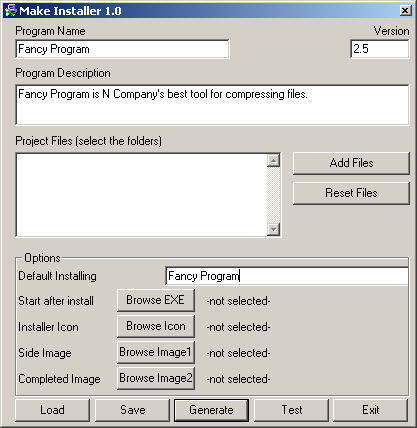
Select a title for your program and the version number. The title you select will be used to reffer your program to the user during installation. Type a description for your software product in the reserved area. To add your application files to a folder just click on Add Files button and select the folder containing the application files. Enter a destination folder name where your program should be installed. The folder will be created under Program Files on user's computer. Your product will be installed to this target folder. To complete the configuration process select the executable file to be run after install (and to create shortcuts for it on user's desktop) - select this file from your application files using the Browse EXE button. Optionally, you can use your own images and icon during the program installation. To customize them use buttons Browse Icon, Browse Image1, BrowseImage2. To complete the setup press the Save button and provide a name to save your project. You can edit previous saved projects using the Load button. Then press Generate button to build your setup executable. This file is located into the Make Installer folder and it's called setup.exe. Press Test button to run the new created Setup program.
Click on the above image to see a screenshot of the configuration interface. |
 |
[ MakeInstaller Site ] | [ Product
Info ] [ Tutorial ] [ Buy
] [ Support ] [ FAQ ]
Copyright © 2006 MakeInstaller.com